Now available for early access
Your private AI environment for intelligent, secure content generation
Designed for institutions where confidentiality is critical, Redacta empowers teams to generate high-impact content using internal data with zero exposure to external systems
Scientific reliability
Redacta is designed to operate on highly complex scientific and clinical content, ensuring methodological consistency, source rigor, and alignment with available evidence
Operational efficiency
Redacta reduces the time and workload associated with research, review, and content production, guaranteeing ongoing updates and controlled versioning
Healthcare stakeholders
Redacta supports scientific societies, pharma and biotech companies, offering a flexible space for education, information, and institutional use
Full control
Redacta uses only materials provided by the user, ensuring full control, transparency, and compliance with scientific, ethical, and regulatory requirements
A secure, end-to-end workflow
Designed for teams that need privacy, structure, and speed
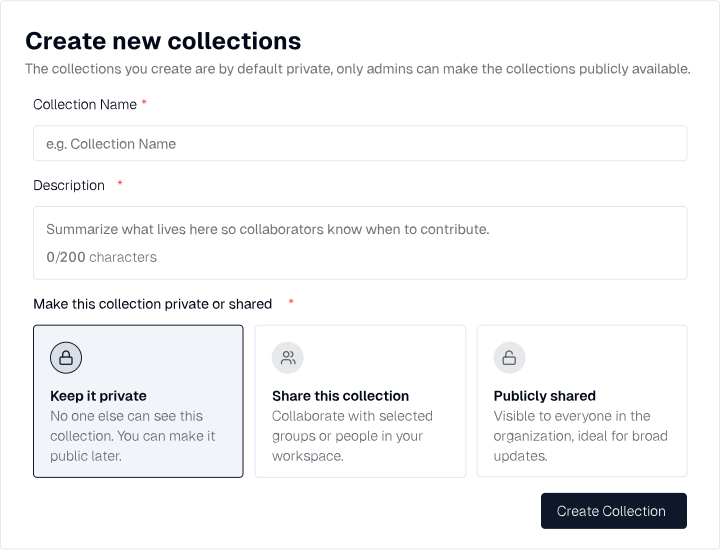
1. Create your collection
Organize your project in a dedicated space
Create a dedicated workspace for your project or research stream by defining its name, description, and access level (private, shared, or organization-wide), keeping your documents organized and allowing the AI to focus solely on the sources you choose
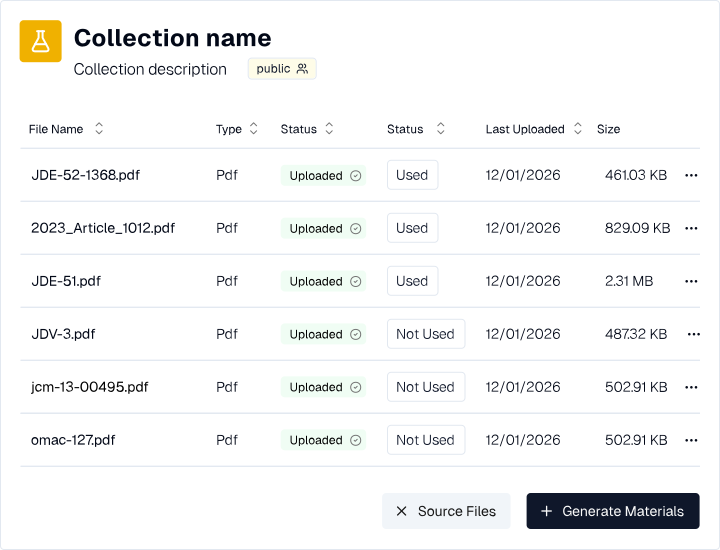
2. Upload your files
Provide the AI with the resources it needs
Add the documents that will fuel your AI-driven content. Upload PDFs, Word files, Excel sheets, PowerPoints, images, and more — all processed securely inside your environment. Your data never leaves your control, and every file is encrypted end-to-end
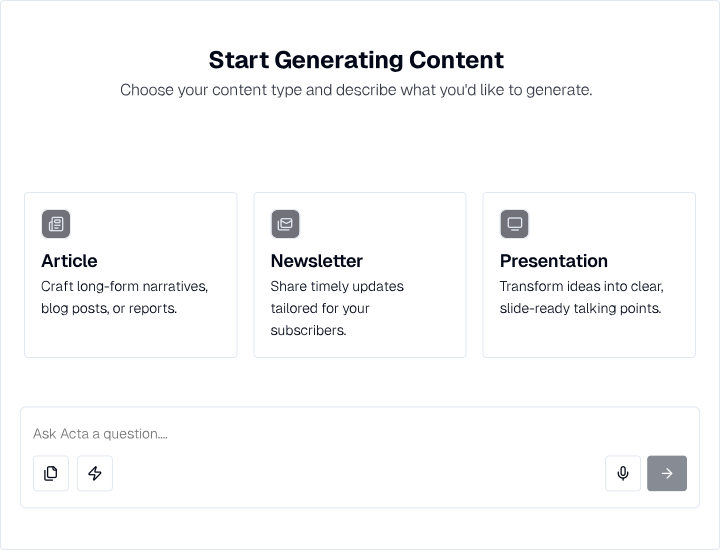
3. Generate new content
Turn your documents into concrete results
Start creating articles, newsletters, presentations, or custom outputs by simply selecting the type of content and describing what you need, generating results based solely on the documents in your collection without external data or hallucinations from the open web
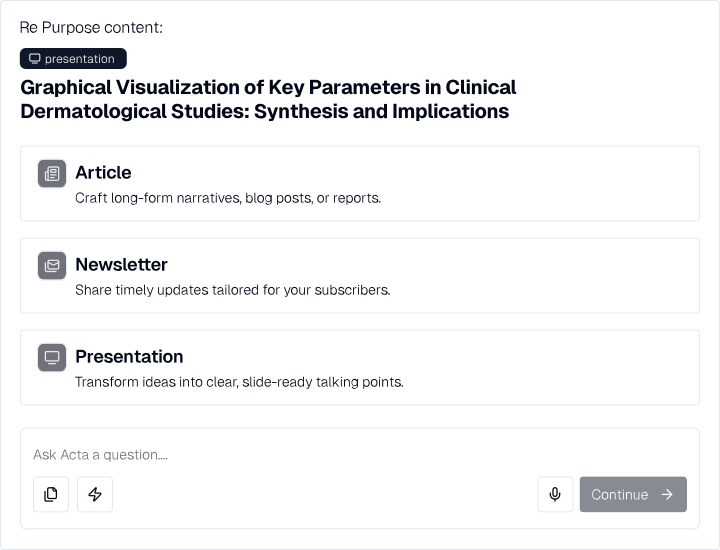
4. Reuse generated content
Quickly turn content into new formats without starting over
Convert any previously generated asset into a new format in seconds. Turn an article into a newsletter, a report into a presentation, or adapt your content for a different audience. Maximize the value of every piece of content you create
Platform features
A complete platform for managing bibliographic materials, generating thematic content, and sharing it, with advanced tools for tracking, exporting, and reworking
Data bank
Area dedicata al caricamento dei materiali bibliografici da utilizzare come referenze, con supporto a file PDF, Word e testo semplice
AI Content Management
A complete platform for managing bibliographic materials, generating thematic content, and sharing it, with advanced tools for tracking, exporting, and repurposing
Upload
Dedicated area for uploading bibliographic materials to be used as references, supporting PDF, Word, and plain text files
Collections
Space for collecting thematic content generated from selected bibliographic entries, organized by project or area of interest
Generate Content
Section to start content generation requests via AI prompts, with available formats such as Articles, Newsletters, and Presentations
References
Each produced content includes direct links to the source documents, with all citations highlighted
Document History
Archive of previous queries, useful for reviewing and resuming previous steps
Version History
Tracking of all document versions, providing full control over changes over time
Re-Purpose
Feature allowing query results to be repurposed into different formats, maintaining consistency and quality
Charts and Tables
Support for automatic creation of charts and tables in content when data is available
Strict Mode
Mode that ensures maximum adherence to selected bibliographic references, for highly precise scientific work
Sharing
Option to make collections private, shared with specific users, or publicly accessible
Export
Feature to export created materials in PDF format, ready for distribution or archiving
Summarize
Function that allows creating new content by combining two or more existing contents
Frequently asked questions
Answers to common Redacta questions
What is Redacta?
How does Redacta ensure data security?
What output formats are supported?
Does the platform support multiple languages?
How does the enterprise subscription work?
Can Redacta integrate with existing systems?
How long does it take to set up an account?
What are the limitations of the free plan?
How can I request specific features?
What type of support is available?
Individual and Enterprise plan
A simple and immediate guide to understanding how to access Redacta
Personal Account
Dedicated to those who want to use Redacta independently, as a daily support tool for study, work, or organizing their content
- Create your own private workspace
- Upload documents and materials to organize
- Start one or more personalized projects
- Share projects with other Redacta users
Account for Associations and Companies
For organizations that want a secure and collaborative environment to accelerate the creation and dissemination of scientific content
What the Admin can do:
- Invite and remove users from the organization
- Decide access levels (view, edit, upload)
- Create Data Banks with validated materials
- Share Data Banks and projects with members
What users can do:
- Access the Data Banks shared by the Admin
- Add their own documents to enrich the work
- Create personal or collaborative projects
- Work together by securely sharing content